
One of the biggest parts of learning to sell sports cards on eBay has been discovering which mistakes actually matter. Some mistakes cost you a few dollars. Some cost you a sale. Others quietly show up on your seller account and stick around for a while. I recently learned that last one the hard way.
Two Mistakes, Two Transaction Defects
Within a relatively short period of time, I managed to pick up two transaction defects on my eBay account.
The first came from a card I sold that had the wrong photos attached to the listing (same card, but a different copy in a very different condition). After the sale, I realized the pictures weren't actually of the card I had sold. I obviously wasn't going to knowingly send the buyer a card that didn't match the listing, so I canceled the transaction. When eBay asked for the cancellation reason, I selected "out of stock."
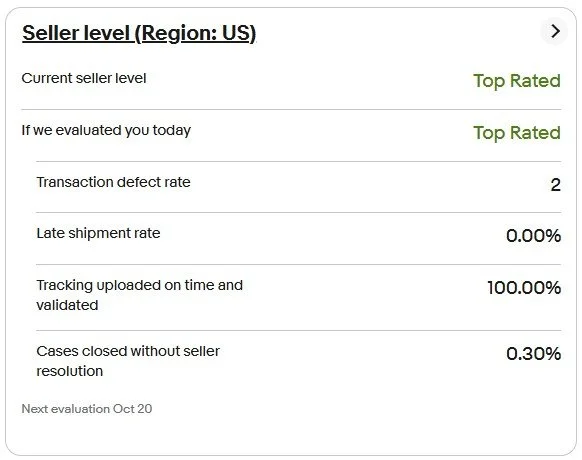
Sale canceled. Buyer refunded. Problem solved. Except it wasn't. An out-of-stock cancellation counts against your transaction defect rate.
Lesson learned.
The second defect was probably even more avoidable.
I had an issue with another transaction where the buyer needed to be refunded. I didn't issue the refund before the deadline because I didn't fully understand what would happen next. eBay eventually stepped in and handled it.
Again, I initially viewed this mostly as a transaction-level issue. The buyer got their money back and the situation was resolved. What I didn't realize was that allowing eBay to step in can result in a case closed without seller resolution. And that can count against your seller performance, too.
So there I was: two relatively ordinary mistakes and two transaction defects.
That's When I Started Paying Attention
I'll admit that I hadn't spent much time thinking about transaction defect rates before this. I didn’t even really know what they were. I pay attention to feedback. I ship quickly. I package cards carefully. I respond to buyers. I try to accurately describe everything I sell. But the actual mechanics behind eBay's seller-performance standards?
Apparently I still had some learning to do.
And when I saw two defects sitting there, I started wondering how close I was to creating an actual problem for my account. That's when I learned something important: not all seller mistakes end when the transaction ends.
Some become part of the metrics eBay uses to evaluate your account.
The Numbers Matter
eBay's seller standards are based partly on your transaction defect rate, and the requirements become particularly important if you're trying to maintain Top Rated Seller status. That means the occasional mistake isn't necessarily catastrophic, especially if you have enough transaction volume to absorb it. But it also means you don't want defects piling up.

Two isn't something I'm panicking about. But I'm also not interested in adding a third. The better approach is to understand what causes defects and avoid collecting them in the first place.
Lesson #1: Be Careful With Cancellation Reasons
This one seems obvious in hindsight. If you're canceling an order, the reason you select matters.
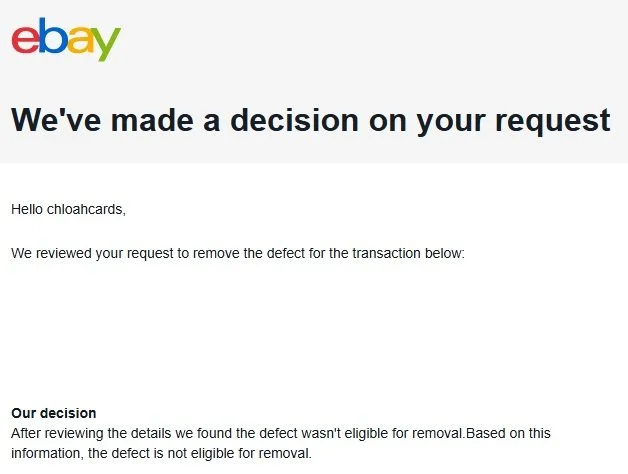
In my case, I genuinely couldn't complete the transaction as listed because I had screwed up the photos. Selecting "out of stock" seemed like the closest available option. Unfortunately, an out-of-stock cancellation is exactly the type of cancellation that can count as a seller defect. I actually requested that eBay remove this defect. They denied the request.
So this wasn't a case where I could simply explain what happened, get the defect wiped away and move on. The listing mistake was mine, the cancellation resulted from that mistake, and eBay left the defect in place.
That's an important part of the lesson.
You shouldn't assume that because a mistake was innocent—or because you were trying to do the right thing for the buyer—eBay will remove the resulting defect.
And that doesn't mean you should select an inaccurate cancellation reason just to protect your metrics. It means you should understand that canceling a sale because of a seller-side mistake can have consequences beyond losing the sale. The real solution is preventing the situation in the first place. For me, that means being more careful when creating listings and making sure the card in my photos actually matches the card I'm listing.
Simple stuff. Until you mess it up.
Lesson #2: Never Let a Case Sit
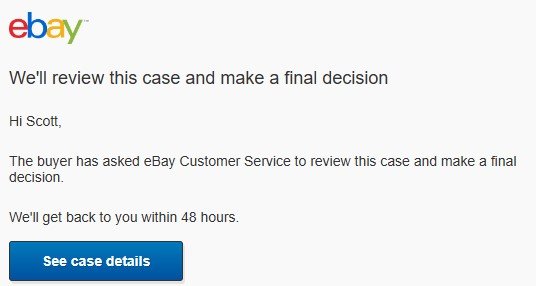
This was probably my bigger mistake. If eBay gives me a deadline to respond, refund or otherwise resolve an issue, I'm treating that deadline very differently now. I'm not assuming the system will eventually sort itself out. I'm not waiting to see what happens. And I'm definitely not assuming that eBay stepping in is basically the same thing as me issuing the refund myself. It isn't.
In my case, I didn't respond in time and eBay stepped in. That resulted in another defect. Unlike the cancellation defect, I wasn't even able to challenge or appeal this one.
And really, I can't complain much about that. I screwed up. I should have responded and handled the refund before the deadline. I didn't. eBay stepped in instead, and now the defect is sitting on my account. That one is entirely on me.
The lesson is simple: if I owe the buyer a refund, I'm going to handle it before eBay has to. I'd much rather voluntarily lose the money I already know I'm going to lose than lose the money and take a hit to my seller metrics.
Lesson #3: Seller Metrics Aren't Something to Learn After You Need Them
This is probably the biggest lesson from the whole thing. When I started selling cards, I spent most of my time learning about the obvious stuff: How to price cards, ship cards, handle offers, deal with returns, list efficiently, etc.
Seller-performance metrics weren't exactly at the top of the list.
But once you're doing meaningful transaction volume—especially if you've worked your way up to Top Rated Seller status—they matter. You don't need to obsess over every number on your Seller Dashboard. You should, however, understand which actions can hurt you.
I didn't. Now I do.
Sometimes the Defect Just Stays
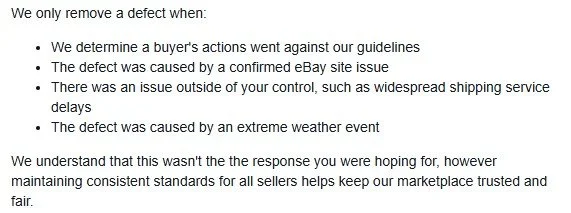
When I first saw the defects, my immediate thought was figuring out how to get them removed. I tried with the cancellation. Denied.
I looked into challenging the case where eBay stepped in. I couldn't.
So, at least for now, both defects are staying. That's actually another useful lesson from this experience. Yes, eBay has processes for reviewing certain defects and seller-performance issues. But you shouldn't operate under the assumption that you'll always be able to explain your way out of one after the fact.
Sometimes you can get something corrected. Sometimes you can't. And sometimes—as in my case—you simply made a mistake and have to live with it. That's a pretty good incentive to understand the rules before you accidentally break them.
Another Entry in the Cost of Learning
I've written before about mistakes I've made while building Chloah Cards. I've missed condition issues. I've learned lessons about shipping. I've dealt with buyers claiming packages never arrived. I've had eBay Authentication reject a card. Now I can add transaction defects to the list.
That's part of what this entire project has been about. I'm learning how to sell cards on eBay by actually selling cards on eBay. Sometimes that means learning something because I researched it beforehand. Other times it means learning because I screwed something up.
These two defects fall squarely into the second category. The good news is that neither mistake is particularly difficult to avoid going forward.
Double-check the listing before it sells.
Pay attention to eBay's deadlines and resolve buyer issues before eBay has to step in.
And every once in a while, take a look at the Seller Dashboard—not just the sales number. Because sometimes the expensive part of a mistake isn't the refund. It's the little mark eBay leaves behind after the refund is over.
